The most overwhelming aspect of iGaming affiliate marketing can be the disbursal of payouts. When you’re handling multiple partners, in various geographies who must be provided commissions for their efforts at regular intervals, the entire process can become a full-time task.
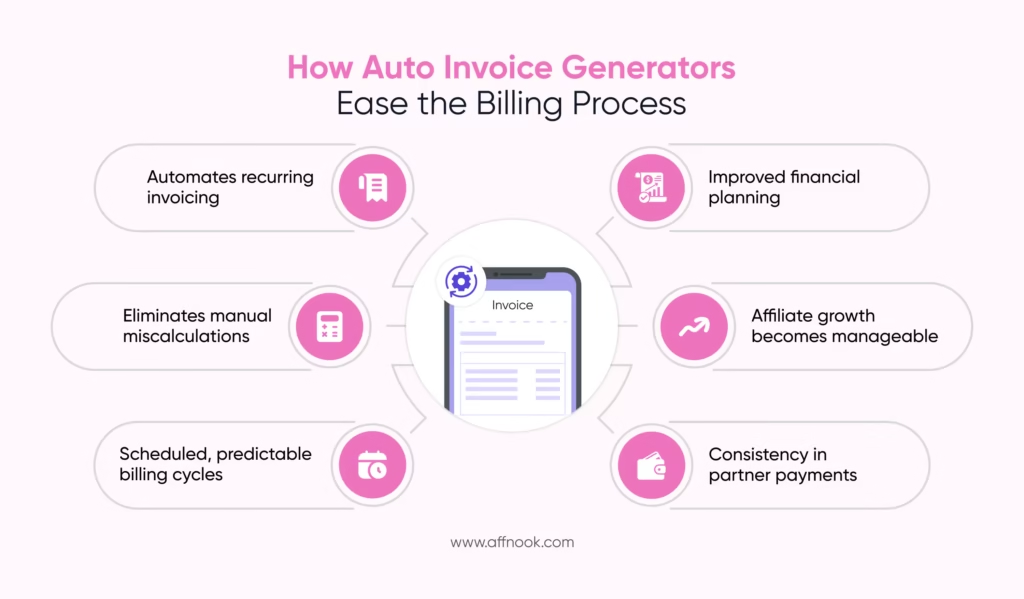
A reliable auto invoice generator allows for the elimination of this repetitive task, reduction in manual errors and regularizing of the entire billing process, without the need for constant follow-ups.
Irrespective of the size of your affiliate program — as an operator, brand or affiliate network — rewarding affiliate partners becomes quick, easy and simple. In fact, the use of automating software means the member of your team processing payments by hand is now free to do better things with their time.
Let’s examine how this type of invoice generating system works, why it matters and how it can be configured at both global and affiliate-specific levels for maximum efficiency.
What is an Auto Invoice Generator?
A system that automatically generated invoices, based on a set of predefined rules such as billing frequency, minimum commission paying thresholds and which currencies to make given payments in, is known as an auto invoice generating system.
Using such a tool allows you to skip manual invoice creation on a weekly or monthly basis, altogether. Instead, the system or tool is set up to automatically initiate and process the documentation and data required at regular intervals.
For busy folks such as online casino affiliate managers at networks and iGaming operations, this is particularly liberating. The benefits offered are immense:
- Timely invoice generation
- Consistency in billing cycles
- Reduced administrative workload
- Improved financial accuracy
- Better compliance and documentation
In this way, the focus remains on optimization campaigns, improving marketing strategy and reducing cost of operations — not just paperwork.
Why Your Operation or Brand Needs an Auto Invoice Generator
Online gambling affiliate campaigns require a lot of work. There’s affiliate management which requires a whole systemic process of its own to keep everything from onboarding to communication in check. There’s also campaign running — stretching from planning partners, building goals or caps and finally, optimizing on the fly.
The variables are often too many:
- A large number of third party promoters, i.e. affiliates
- A variety of payout structures
- Multiple currencies to account for
- Various payment frequencies to manage for many timezones
You’re left with piling errors, late payments and most importantly, strained relationships with partners who keep leaving your affiliate program.
Here are some primary benefits users of an auto invoice generator can experience:
- Time saved
This usually manual task can be left to the devices of the software.
- Errors limited
Since no manual work is involved, the mistakes occurring from human involvement are reduced.
- Better cash flow management
Invoices can be generated on payment cycles, rather than being ad-hoc.
- Scalability
As your affiliate base grows, your invoicing system keeps up effortlessly.
Global Level Auto Invoice Generation
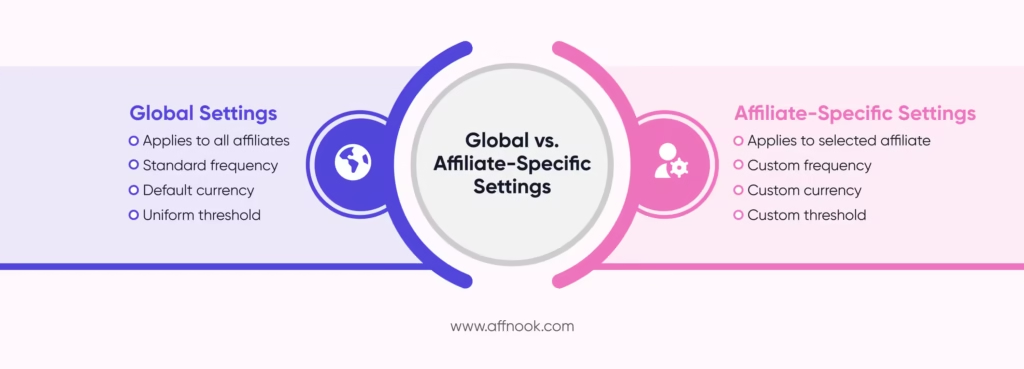
If you don’t want to create the invoicing process for each affiliate one at a time, and instead make it a standardized process, global settings are ideal.
Step 1: Enable Auto Invoice Generation
When you’re on the platform, the ‘Invoice Configuration’ option will lead you to the ‘Auto Generate Invoice’ toggle. When this is on, the auto invoice generator will keep automatically creating invoices at set times and dates, with no intervention required.
Step 2: Set Frequency and Date
Start by defining when you would like these invoices to go out. You could choose from:
- Weekly
- Monthly
- Bi-weekly
To initiate the billing cycle, you will also need to select a date. For instance, if you pick the ‘Weekly’ billing option, you may have to select Tuesday, August 4 so that from the 4th day of August in the given year, every week the invoice is generated on Tuesdays.
Scheduling of the payout calculation ensures that a consistent and predictable payment cycle is created, in line with your business revenue collection structure.
Step 3: Configure Invoice Settings
Now, the financial rules can be finetuned. Three details will need to be added here:
- Minimum Amount Threshold
Add the minimum earnings an affiliate marketing publisher will need to be eligible for to trigger invoice generation. For instance, if the threshold is set at $100, only when the total payouts equal or exceed $100 will the invoice be created.
- Currency
Insert the currency the invoice will need to be generated in. This matters because in the case of online gambling, multi-geo and multi-currency affiliates are involved in the promotional process. Based on the affiliate’s preference, too, this detail can be added on the platform.
- Invoice Email Address
When the auto invoice generator completes the generation process, the invoice will have to be sent to the concerned affiliates to cross-check the details. In case there is no disagreement, payments can be disbursed.
However, in case of contentions, the activity or events attributed to the affiliate can be studied and the invoice can be altered as per discussions, before the payment is sent.
Step 4: Activate the Settings
At this stage, the set up is complete. The settings can be activated and they will be implemented as set.
Affiliate-Specific Auto Invoice Settings
There are instances where specific commission disbursement settings may need to be added for certain promoters. This is where affiliate-specific settings become invaluable.
Step 1: Access Affiliate Settings
Navigate to the section of ‘Affiliate Specific Invoice Settings’ and choose the option for adding a new setting.
Step 2: Configure Affiliate-Specific Details
Start by selecting which affiliate you want to gear this invoicing setting towards. Then you can go ahead and define the same presets as present in the global invoicing setup:
- Status (Active or Pending or something else)
- Minimum payout threshold
- Billing frequency
- Preferred currency
Since contractual agreements define the invoicing standard for each affiliate, this setup overrides the global settings.
Step 3: Save Affiliate Settings
That’s all. You can simply hit ‘Save’ and close the window.
The customized settings will now appear in the affiliate-specific overview section, where they can be reviewed or modified at any time.
Best Practices for Using an Auto Invoice Generator
There are certain methods which can be adopted to add more refinement even when an automatic tool is being used for invoicing. Here’s what you can do:
- Set frequency as per payment cycles: Match actual payout structure to invoicing schedule to avoid confusion or delays.
- Be realistic with minimum thresholds: Not only should such thresholds be aligned with global standards, they should also reflect pre-agreed contractual terms, especially if you have a lot of partners as an iGaming affiliate network.
- Be communicative with affiliates: Inform partners whenever there is any change in the system to be transparent and avoid disputes.
- Regularly review configurations: Audit global and affiliate-level configurations regularly to ensure they’re in line with updated contracts or changing global standards.