The conversion report is where you can go to see exactly how a campaign is performing in an iGaming affiliate marketing program. This includes the number of conversions, the amount of revenue and payout that are generated, and how everything breaks down by affiliate, brand, country, and more.
If you’ve ever wondered, “Which campaign is actually making me money?” or “How many conversions got rejected this month?” This report is the answer to such questions.
What Exactly Does the Conversion Report Do?
It is like a campaign scoreboard that pulls every conversion that is happening across your platform. It lets you slice and differentiate the data however you want, be it through affiliate, date, or brand. With the help of this report, you can analyse the exact user actions, which further helps you with –
- Attribution
- Conversion tracking
- Quality analysis
- Commission analysis
It allows you to apply filters to zoom in on exactly what you are looking for. If one prefers to look at the numbers offline, then the data can also be exported as a whole through a CSV file by clicking on the “save report” button.
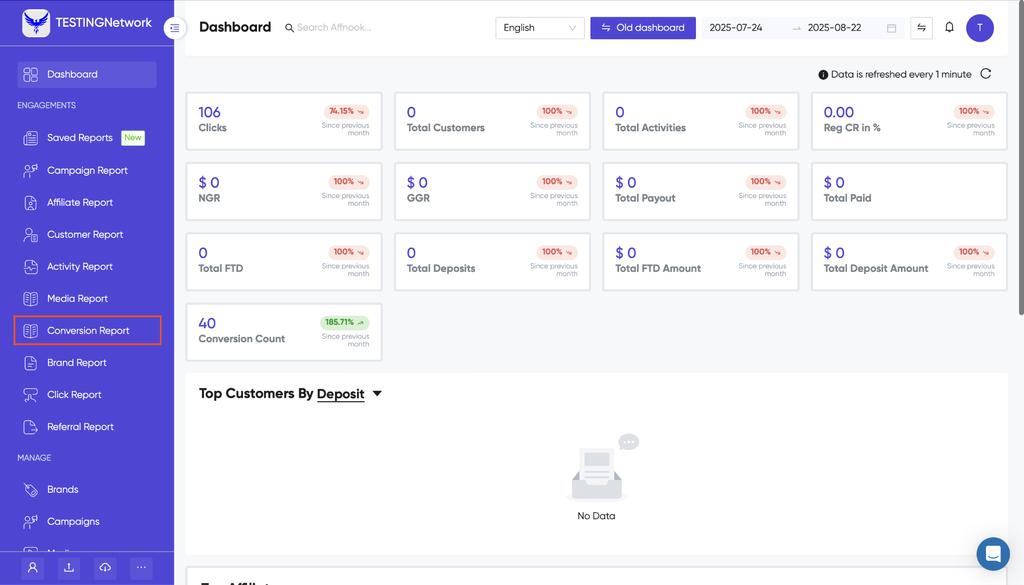
To view the conversion report, go to your “Dashboard” and navigate to the “Conversion Report” section. From here, you can apply a date range, filter the data, or export it entirely.
What Does the Conversion Report Actually Show?
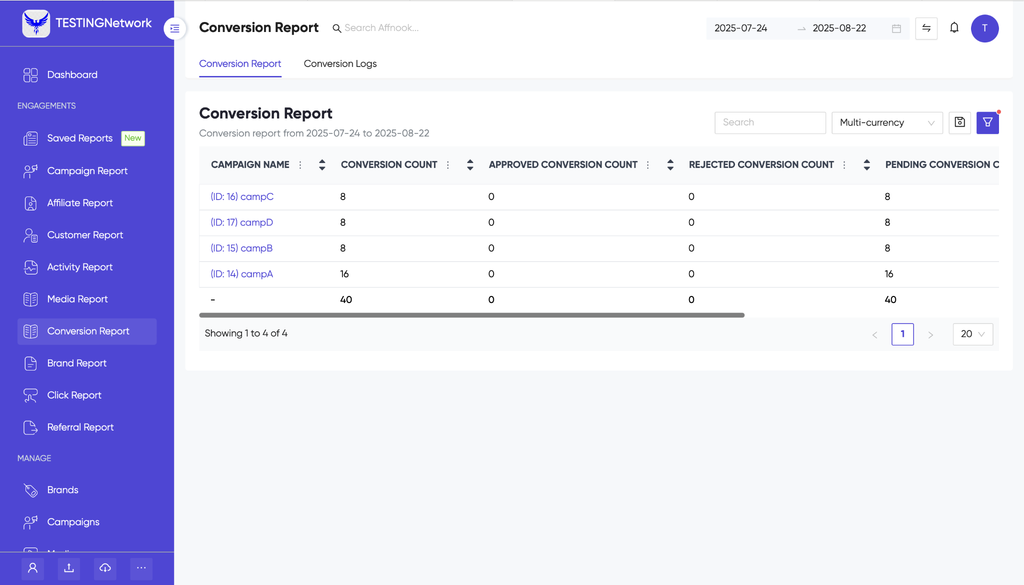
When opened, it shows a key set of fields for each campaign under the report section. These fields include –
- Campaign Name: The name of the campaign associated with the conversions
- Conversion Count: The total number of conversions recorded for the campaign
- Approved Conversion Count: The number of conversions approved by the advertiser
- Rejected Conversion Count: The number of conversions rejected by the advertiser
- Pending Conversion Count: The number of conversions still awaiting approval or review
- Conversion Revenue: The total revenue generated from the conversions
- Conversion Payout: The total payout made to affiliates for the conversions
When put together, this data provides a quick, honest image of how an iGaming campaign is really doing.
Narrowing Down With the Filters
All of the data does not necessarily have to be seen together at once. This is where filters come in. They let you see the exact data that you are concerned with. A few of the key filters include –
- Campaign: Filter conversions based on the specific campaign selected
- Affiliate: Filter conversions by the affiliate or publisher driving the traffic
- Brand: Filter conversions according to the advertiser or brand running the campaign
- Goal Objective: Filter conversions by the specific goal or event being tracked
You can mix and match the filters to get more specific results rather than not choosing any filters, which might make the results look vague.
Grouping the Data Your Way
You can also go beyond filtering by grouping your reports. This means, instead of one long list, the data gets organized into proper buckets based on what is more important to you at the moment. Some of the most common parameters for this grouping include –
- Campaign: Campaign under which the conversion is tracked
- Affiliate: Affiliate or publisher who generated the conversion
- Brand: Advertiser or brand running the campaign
- Goal ID: Unique identifier assigned to a goal
- Goal Value: Value associated with the goal, such as the revenue amount
- Goal Objective: Action or event being tracked as a goal
- Currency: Currency in which revenue or payout is recorded
- Country: User’s country where the conversion occurred
- Date: Specific date of the conversion
- Month: Month in which the conversion occurred
- Source: User’s region where the conversion occurred
- P1–P10: Custom parameters used to capture extra tracking details, such as ad ID, placement, or keyword
Keeping an Eye on the KPIs That Matter
The report also highlights a few key performance indicators (KPIs) so you don’t have to calculate them yourself –
- Conversion Count, Approved Conversion Count, Rejected Conversion Count, Pending Conversion Count: The same conversion breakdown as above, tracked as KPIs
- Conversion Revenue and Conversion Payout: Total revenue earned and total payout made for conversions
- Conversion Profit: Calculated as revenue minus payout, giving you the net profit for a campaign
Reviewing Individual Conversions with Conversion Logs
Sometimes the bigger picture is not fruitful enough, and you need to look beyond the aggregated numbers. Conversion logs give you a record of every individual conversion tracked on the panel. You can access Conversion Logs by navigating to the designated section within the conversion report.
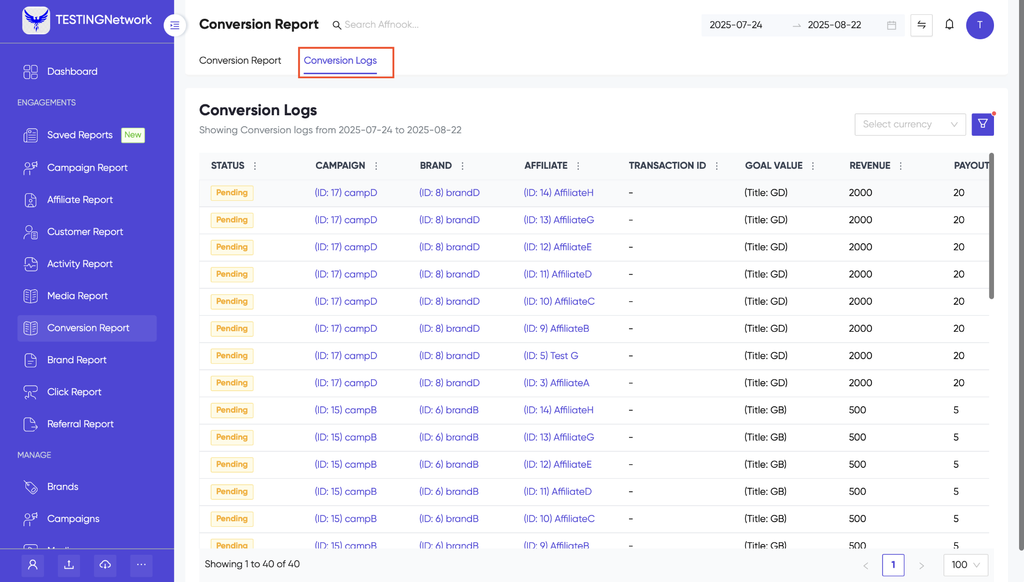
Here, you’ll be able to view every individual conversion that has been recorded on the panel.
Conclusion
The conversion report is the foundation of understanding attribution, tracking quality, and analysing commissions across the affiliate program. Combining the right filters and groupings in this report will give you a view of the precise breakdown of exactly which affiliate, brand, country, or source is driving results.
It will also help you understand which conversion requires closer attention. Whenever the aggregated numbers aren’t enough, the Conversion Logs are right there to show you the full picture, one conversion at a time. If used well, this tool can help you make sharper decisions about where you can invest, the partnerships that you can strengthen, and where your program might be leaking value.