When it comes to partner marketing, running campaigns comes at a cost — the reward paid out to affiliates who fulfil the goal of the given campaign. This payout or commission is determined and set up before the campaign is created and ever goes live.
Therefore, a key consideration within the purview of affiliate managers remains: how to set up payout structures that reward fairly, while maintaining pre-determined budgets.
A well-configured system is capable of dishing out attractive payments for each relevant action of publishers around the world, while maintaining ROI-sense. As a result, performance metrics like clicks, registrations and deposits become achievable, as conceived in business plans.
Let’s understand how to set up payout for affiliates on Affnook in a step-by-step manner, including adding payouts and configuring rule engines within your dashboard.
What Falls Under ‘Payout’
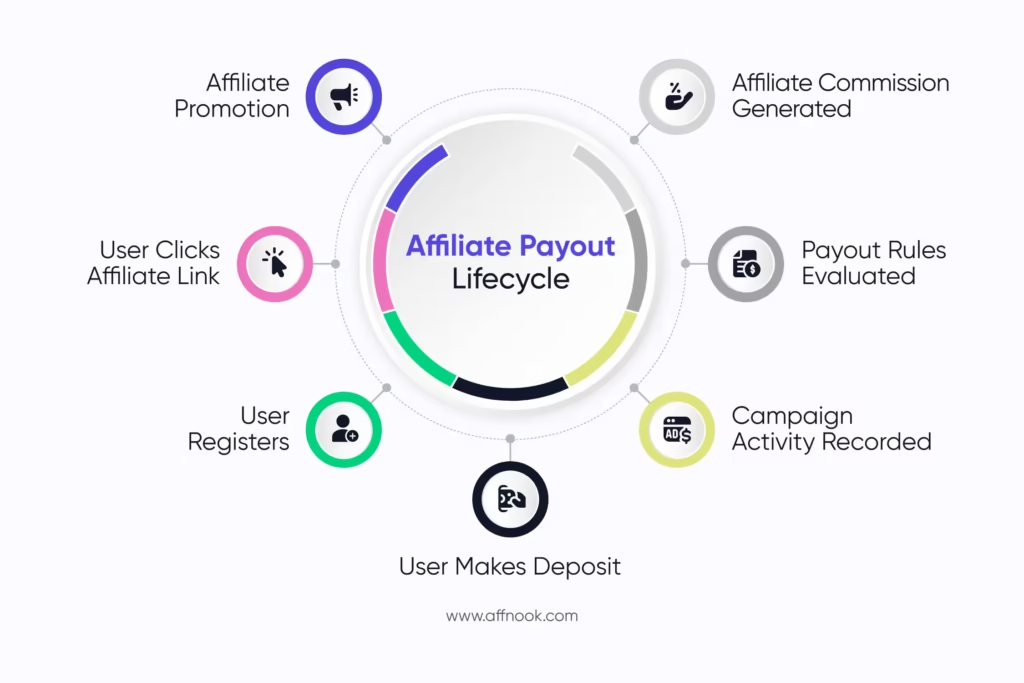
Affiliates or third-party publishers drive specific actions (also sometimes called conversions) in exchange for a payment per action. This payment is referred to as a commission or a payout within performance and partner marketing.
In the case of iGaming, the required actions are usually one or more of the following:
- Sign up or registration on the platform
- First time deposit
- Re-deposit
Why Should Operators Set Up Payout in the First Place?
Setting up a payout system with clear incentives for particular actions for individual affiliates, groups of affiliates or partners based in different countries gives campaign managers more control.
Doing this all on an iGaming affiliate marketing platform like Affnook provides operators, brands and affiliate networks more flexibility, and rule-based options for global or specific application.
As a result, the post-campaign process is optimized to save time and manpower, both.
How to Set up Payout for Affiliates?
Setting up payouts involves a few straightforward steps. On Affnook, the process gives casino affiliate managers the ability to align such incentives in line with campaign requirements, budgeting limits and affiliate agreements.
Here’s how you can get started.
Add a New Payout
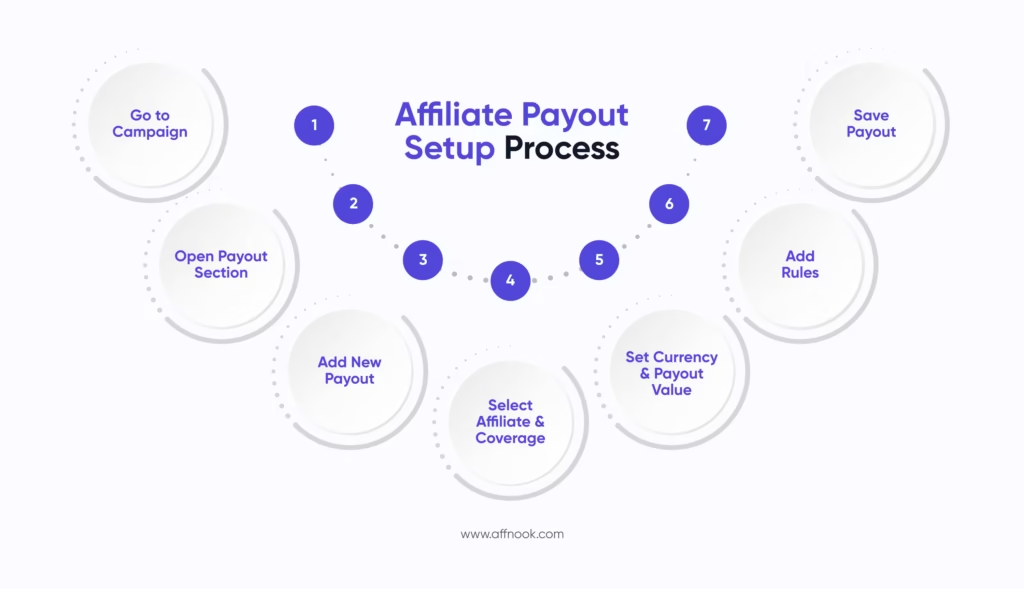
The first step in learning how to set up payout is creating a new entry while setting up your campaign. You can follow the steps listed below to begin.
- Under the ‘Campaign’ section on your dashboard, find ‘Payout’.
- Choose to create a new payout through the ‘Add New Payout’ option.
Within this section, you can create, manage and edit all commissions that apply to iGaming affiliates across your casino program or campaigns. As it stands, payout structures can be set for specific partners, one at a time, or for groups of affiliates.
Fill in the Required Details
At this stage, you will add the configuration details to refine payout. There are four fields which need to be completed:
- Affiliate Selection
Select the affiliate for whom the payout will apply. If it should be applicable to all, simply select ‘All’.
You can also create multiple payout configurations for different affiliates or groups. This flexibility allows you to reward top-performing affiliates with higher commissions while maintaining different payout levels for others.
- Coverage
By filling this blank in the process, you can choose the regions where a particular payout configuration will apply.
For instance, if a specific country is selected, the affiliate will receive the payout only when user activity originates from that country. If you wish for the rule to apply globally, you can select ‘All’ here as well.
This feature is particularly useful for campaigns targeting specific geographic markets.
- Currency
When it comes to iGaming, businesses can be placed in one geography, with campaigns being run elsewhere through affiliates who are present across countries. Due to this, a key question to answer while processing how to set up payout is which currency to calculate and transfer the commission in.
The currency can be selected from the dropdown list based on the campaign’s financial settings.
- Payout Value
Enter the payout amount or percentage depending on the payout plan you are using.
- If the commission structure is on CPA, add a fixed value.
- If you’re using revenue share, add a percentage for payout calculation.
At this point, the basic facts have been included already.
Add Payout Rules
Configuring payout rules is a critical part of understanding how to set up payout. They matter because these rules allow you to control when and how payouts are triggered.
Rules can be based on several performance variables, including:
- Bets
- Withdrawals
- Deposits
- First-Time Deposits (FTD)
Each rule features an ‘operator’, that determines the condition of the given payout rule. Within the ‘operator’ you can specify whether a value must be greater than or less than a defined number.
Here you’re basically filling in items like:
- Bets over ‘X’ amount will lead to payout.
- Deposits between ‘A’ and ‘B’ amounts will result in a commission.
After selecting the operator, enter the numeric value for the payout rule. The payout will only apply when the affiliate meets this condition.
Here, you can add more than one rule as well. Performance criteria can be layered according to the requirements of the campaign being set up or the business goals that are predefined. As a result, the campaign data and automated invoices will reflect values in line with the payout rules.
Access Payout Details for Affiliates
You can always go back and modify the structure set up for any given affiliate or group. By clicking on ‘Payout Details’, you can open the configuration panel where all payout information is displayed.
From this section, you can review the payout structure assigned to affiliates and make necessary adjustments, if required.
Configure Payout Details
Inside the payout details section, you will see several fields that define how commissions are calculated.
- Currency
Select the currency in which the affiliate payout will be processed.
- Payout Plan
There are two main payout plans available:
- CPA: On FTDs and registrations
- Revenue share: On FTD and NGR
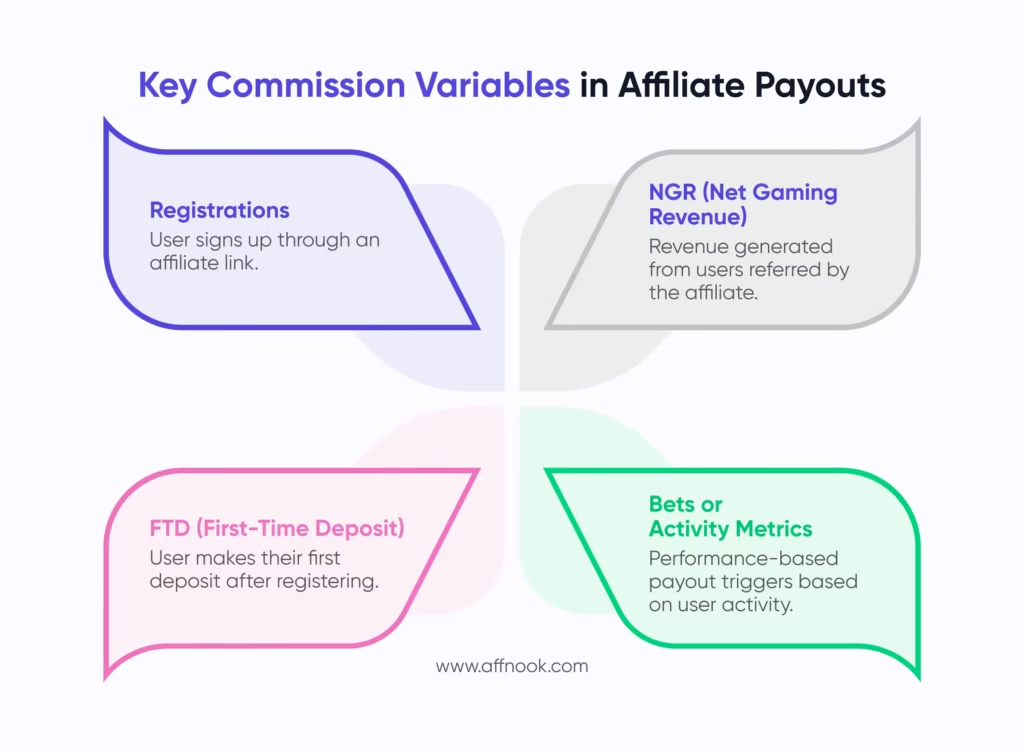
- Commission Variable
Depending on the payout plan selected, you can define the commission variable used to calculate payouts. The choices are as listed:
- Registrations
- First-Time Deposits (FTD)
- Net Gaming Revenue (NGR)
- Location
The location field displays the geographic regions associated with the campaign. This ensures payouts align with the coverage settings configured earlier.
Can Payouts be Edited Once Added?
Before the campaign shows any activity, editing is very much possible. Once data begins to flow into the campaign on a real-time basis, payout configurations can no longer be edited.
This ensures financial accuracy and reporting consistency across every single action (click to re-deposit) as they are recorded without a minute’s delay.