What if all the affiliates are paid the same? What would be the consequences?
What will happen is that –
- The high-performing players will be lost.
- The platform will be flooded with low-quality traffic.
- There will be severe margin compression.
- Affiliates will lose their financial incentives to optimize their funnels, run paid ads or even scale their monthly traffic.
Irrespective of the campaign type, be it CPA or RevShare, a flat commission structure does not reflect on the actual performance difference between the partners. An iGaming affiliate who performs the same as the rest of the affiliates should not be treated the same
Businesses that shift from flat-rate commissions to a tiered, range-wise structure see an average boost in affiliate-driven sales of up to 30%
This is why not every conversion can carry the same weight, and not every affiliate drives the same volume. This is also where the range wise payout feature on Affnook becomes necessary.
What is the Range Wise Payout Feature?
It lets you define variable commissions based on specific performance conditions, so the payout is automatically and directly proportional to the range they fall within, without manual adjustments. It also ensures precise and flexible commission management.
This feature is especially intended for CPA + FTD campaigns, and even for RevShare + FTD campaigns, since FTD is treated as a commercial variable.
Note that this feature is not available by default and must be enabled for your account. To get it activated, you must reach out to your account manager so that you can configure it on your panel.
Why Range Wise Payout Matters in iGaming Affiliate Marketing
In iGaming affiliate programmes, the commission structure should go hand in hand with the performance variation. A single flat commission cannot be applicable for everyone. It either overrewards even the underperforming affiliates or does not incentivise top performers to generate better outcomes.
Range wise payout provides operators with the tools to handle this more effectively through –
Performance Aligned Commissions
Payouts are tied to defined performance boundaries. This way, the affiliates who earn more can deliver even better results without the need for any manual renegotiations.
Flexible Campaign Logic
Operators get the authority to control how ranges are structured and what each one pays out. A maximum of 10 rules can be set per campaign, providing a granular view of the tiered structure that matches the programme’s goals.
Fallback Control
A configurable default payout ensures that an operator is prepared for what happens when a conversion doesn’t fall within any defined range. Whether it is a baseline commission or a zero payout.
Reduced Operational Costs
Once the rules are set and in place, Affnook automatically takes charge of the matching and commission logic. There’s no need to track which tier an affiliate falls into manually.
Now that we have developed an understanding of what range wise payouts are and why they matter, let us now understand the steps to actually set and activate the feature.
How to Set Up Range Wise Payout on Affnook
Step 1 – Navigate to the Campaign
Log in to your Affnook panel and go to the “Campaigns” section from the dashboard under the ” Manage ” section. Create a new campaign or select an existing one that has to be configured.
Step 2 – Open Payout Settings
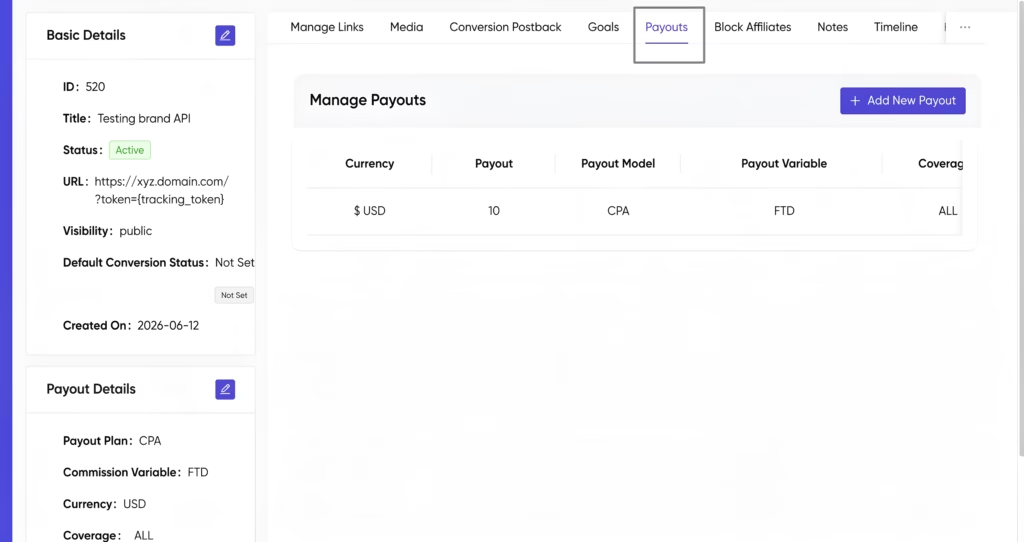
Inside the campaign page, navigate to the “Payout” section and click on “Edit” to modify the payout settings.
Step 3 – Enable Range Rule Payout
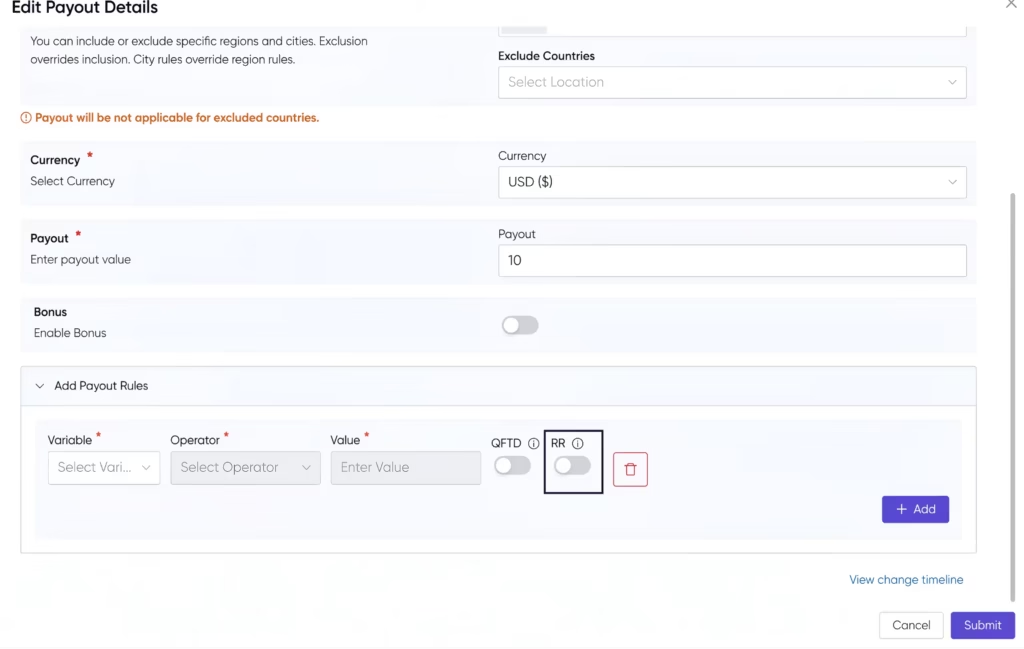
Go to the “Add Payout Rules” section at the bottom of the screen. Click on the add button where you will then find the QFTD and RRP toggles.
Click on the RRP toggle to turn it on. Note that once the rule range payout feature is enabled, it cannot be turned off, you can only delete the rule and create a new one instead.
Step 4 – Add Range Rules
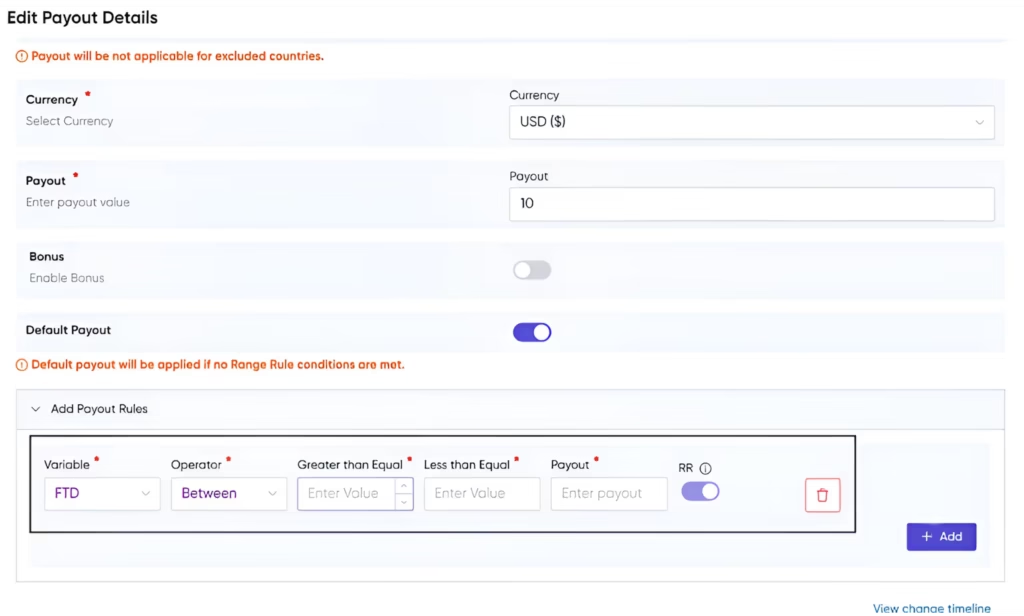
After clicking on the “Add Rules” button, fill in the following fields for each rule –
- Greater than Equal – minimum value for the range
- Less than Equal – maximum value for the range
- Payout – commission amount for this range (ensure that the decimal value is correct)
Step 5 – Save the Configuration
Review all the range rules and payout values, then click on “Submit” to apply the range wise payout settings to the campaign.
Note that if no range rule conditions are met for a conversion, the default payout feature will be applied. That too only if the “Default payout” toggle is enabled.
What to Keep in Mind Before You Go Live?
The range wise payout feature provides precise control over commission logic only if it is set up accurately and well thought out from the beginning. Hence, before activation –
- Confirm that all ranges are mutually exclusive, and no bands are overlapping.
- Double-check all decimal values in payout fields to avoid miscalculations.
- Decide on the default payout setting beforehand based on what should happen if the rule does not match by any chance.
- Verify with your account manager that Range Wise Payout has been enabled for your account.
Once everything is in place, Affnook automatically matches each conversion to the correct rule and applies the right commission.