
In affiliate marketing, precise and accurate tracking of attribution is everything. No matter what the marketing KPI is — FTD, recurring deposit or just registration — real-time metrics allow affiliate managers and affiliates in optimizing their efforts towards generating the required outcomes.
Postbacks enable this entire knowledge chain to form and operate seamlessly. They facilitate the transmission of event or activity data on sign-ups, FTDs and more to the affiliate tracking platform (and to the partners running the promotions).
With affiliate software like Affnook, a secondary platform is available to affiliates where they can track their own performance. The affiliate postback test ensures that tracking is configured correctly and that data flows accurately between your system and your affiliate’s platform.
Let’s understand how this system works, and how it can be set up correctly.
What is an Affiliate Postback?
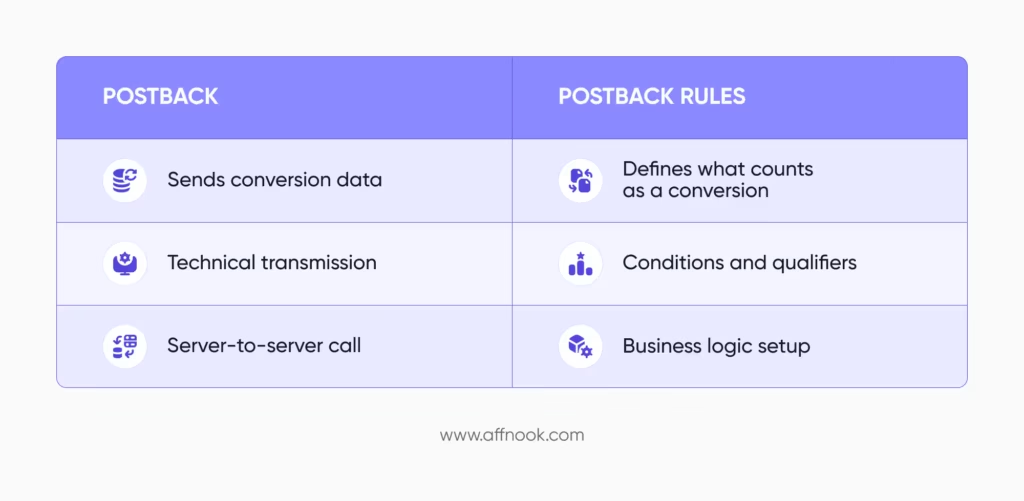
A postback (also known as a server-to-server callback) sends conversion data automatically from the operator or brand’s platform to the affiliate marketing software, when a desired ‘conversion’ activity occurs.
The benefit of using this method is that it doesn’t rely on the browser to store the content, which was prevalent before cookieless tracking became the norm.
A postback can directly send data from one server to another, which makes this type of tracking process more secure, reliable and accurate.
However, it is crucial to understand that this differs from postback rules, which are used to set up qualifiers around what counts as a ‘conversion’. In comparison, the test allows affiliates to keep a track of their performance across campaigns.
An affiliate postback test is a crucial best practice before any campaign goes live within iGaming affiliate marketing. It offers several benefits, including:
- Accurate event tracking
- Proper macro mapping
- Successful transmission of activity data
- Reduced risk of tracking discrepancies
Now let’s understand how this process can be carried out while using an online casino tracking software platform.
How to Add a Postback for an Affiliate?
In the campaign creation process, before running the affiliate postback test, you need to make sure the postback has been set up correctly.
Step 1: Go to the Section
Navigate to the ‘Affiliate’ option under the ‘Manage’ menu. Here you’ll find a menu item called ‘Postback’. On navigating to this option, you’ll be able to ‘Add a Postback’.
This will open the configuration form where you can set up the postback details.
Step 2: Fill Out the Form
The following sections will need to be filled out to add a new postback on the panel.
- Event Selection
Choose which event you wish to configure the given postback to. You can choose among the following:
- New FTD
- New user sign-ups
- For every recurring deposit
Each event requires separate configuration. You can also create multiple postbacks for the same affiliate promoter for multiple events.
- Campaign
Select the campaign associated with the affiliate for which you are configuring the postback.
- Affiliate
Select the relevant affiliate you want to associate with this postback.
- URL
Enter the affiliate’s postback URL.
Ensure:
- The correct URL is inserted
- Appropriate macros are mapped against affiliate parameters in the tracking link
- Macros match data required to avoid tracking errors
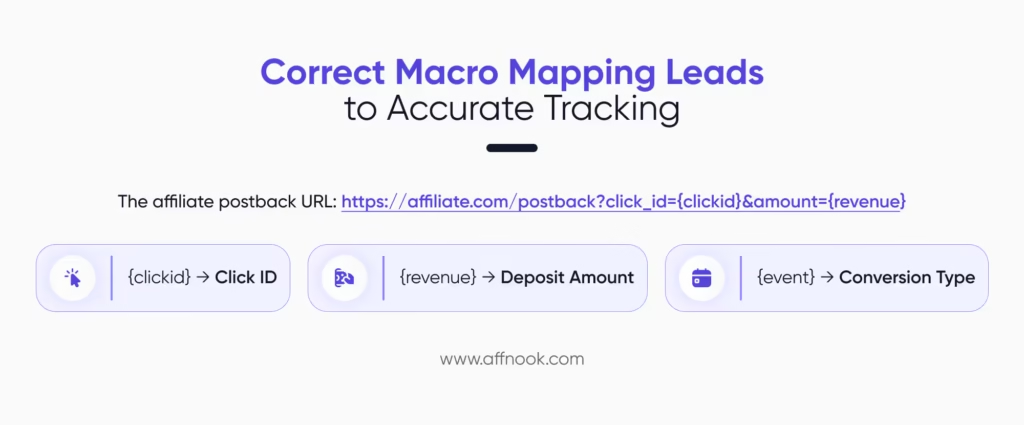
These are critical steps since incorrect macros are one of the main reasons for the failure of affiliate postback test cases.
- Status
There are two options which can be selected herein:
- Active
- Pending, which are awaiting confirmation or where the configuration is incomplete
Step 3: Submit the Details
Once you submit, the given postback will be added for the affiliate. The same process can be repeated to add more postbacks for additional events or for more affiliates.
How to Conduct an Affiliate Postback Test?
Before you decide to make any given iGaming campaign live, it is important to test whether the affiliate postback has been added correctly. This ensures that activities are recorded correctly and that postbacks are successfully fired to the affiliate.
Here’s how this test can successfully be conducted.
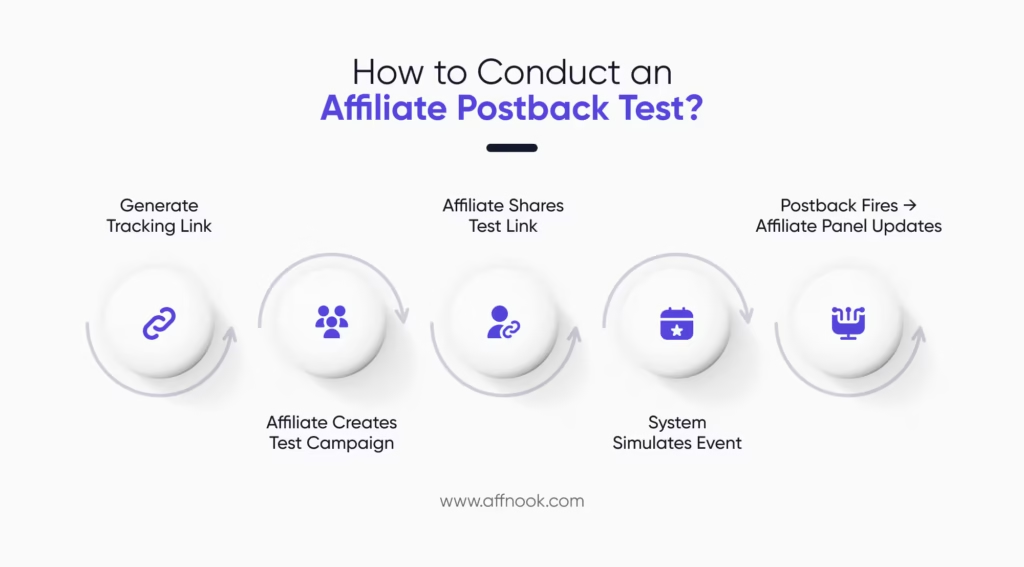
Step 1: Generate the Tracking Link
Start by creating the tracking link for a given affiliate. Then share this link with them. The affiliate ideally should:
- Create a campaign using the provided URL
- Generate a test link
- Share the test link back with you
This test link will be used to check whether the firing is as intended or not.
Step 2: Add Postback (If Not Already Configured)
You need to have the postback set up (as discussed at the beginning of this article). It’s vital you first confirm that:
- The postback has been added
- Correct macros are implemented
- The status is set to ‘Active’
When you run a campaign without configuring the postback, it is possible that the data may show up on the tracking platform, but it won’t be reflected in the affiliate’s records. The test is run primarily to confirm successful event firing to the affiliate’s system.
Step 3: Run the Affiliate Postback Test
To actually execute the test, here’s what you need to do:
- Go back to the ‘Affiliate’ section
- Navigate to the ‘Postback Testing’ page
- Paste the affiliate’s test link into the ‘Test Tracking Link’ field and run the test
The system will simulate the event and trigger the configured postback.
Step 4: Evaluate the Test Results
All you have left to do is confirm whether the affiliate can see the results on their panel. If yes, the firing is successful and you can go ahead with your campaign.
If it isn’t firing right, the affiliate can be asked to verify their test link and macros can be double-checked.
Best Practices for a Successful Affiliate Postback Test
To avoid tracking issues:
- Always test before launching campaigns
- Verify all macros carefully
- Confirm event selection accuracy
- Use filter options to review configurations
- Maintain communication with affiliates during testing
A well-executed affiliate postback test is a powerful tool in the scheme of iGaming affiliate tracking for creating seamless attribution chains, giving out accurate commissions and maintaining strong, long-lasting affiliate partnerships.