Every affiliate program runs on communication. Welcome emails, commission updates, campaign alerts, these are the touchpoints that keep your affiliates engaged and your operation running smoothly. But without a properly configured SMTP domain, your emails stop going out right, and the communication breaks down fast.
That is where SMTP configuration on Affnook comes in. SMTP, or Simple Mail Transfer Protocol, is the standard protocol used to send, receive, and relay outgoing emails between senders and receivers.
When you send an email, it travels across the internet from server to server using SMTP. Setting it up correctly on your Affnook panel means your affiliates, brands, and team members receive automated emails without interruption.
Why SMTP Configuration Matters for Your Affiliate Program
When you run an iGaming affiliate program, email is not optional. It is how you notify partners about approvals, commission changes, login credentials, and campaign updates. Without a properly configured SMTP domain, those emails either do not send or end up in spam.
Affnook lets you connect your own SMTP domain and server directly to the platform. This gives you control over the sender identity, delivery reliability, and security settings for all outgoing communications. Whether you use Gmail, SendGrid, Mailgun, or any other provider with its own SMTP domain, the setup follows the same steps.
Step 1- Add SMTP Configuration
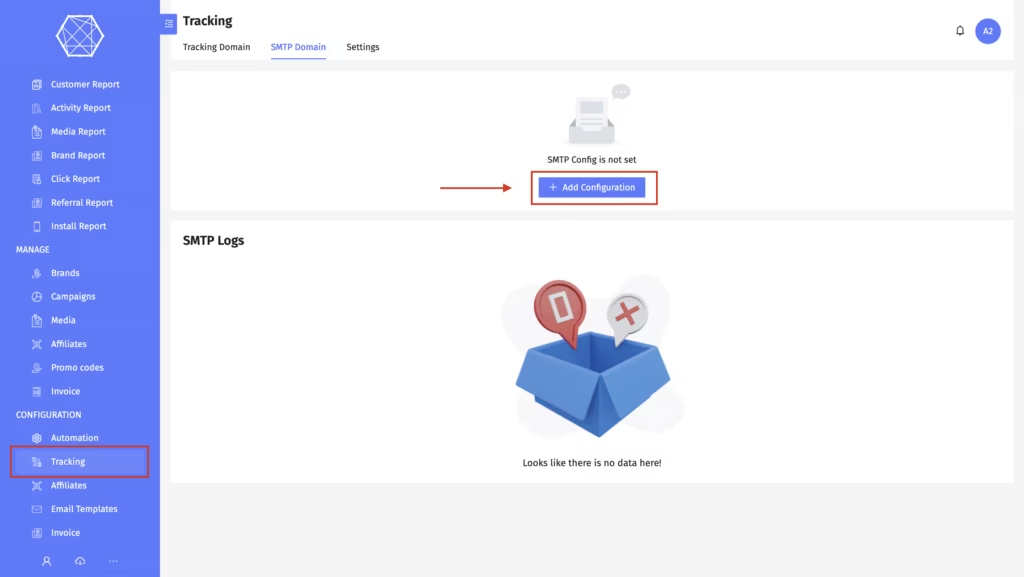
To get started, log in to your Affnook panel and navigate to the ‘Configuration’ section. From there, click on ‘Tracking’ and then look for the SMTP Domain option. Click ‘Add Configuration’ to open the setup form.
Step 2- Fill in the SMTP Details
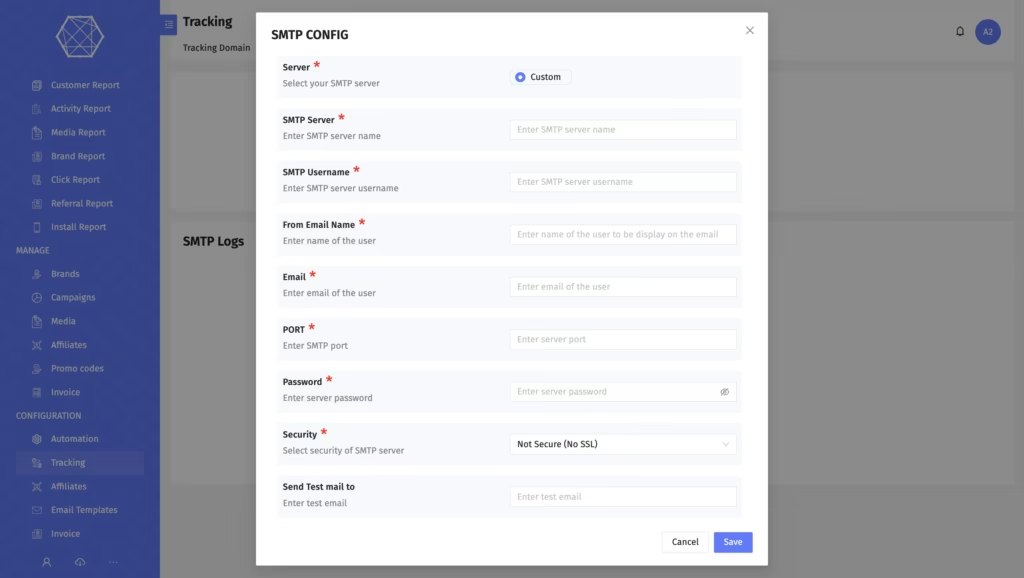
Once the configuration form is open, you will need to enter the following details.
SMTP Server – This is the address of the mail server you want to use. Your SMTP provider will give you this. For example, Gmail uses smtp.gmail.com, while other providers like SendGrid or Mailgun have their own SMTP domain and server addresses.
SMTP Username – Enter the username or email address associated with your SMTP account. This is typically the email you use to log into your mail service provider.
From Email Name – This is the display name that will appear in the “From” field when your affiliates receive an email. It could be your brand name or the name of your affiliate program.
Email – Enter the email address from which outgoing emails will be sent. This should be the email you have integrated with your SMTP domain and server.
Port – Your SMTP provider will specify which port to use. The most commonly used ports are 25, 587, and 465. Port 587 is generally recommended for STARTTLS connections, while 465 is used for SSL/TLS.
Password – Enter the password for your SMTP account. This is the same credential you use to access your mail server interface.
Security Type- Select the security protocol based on what your SMTP provider supports. Affnook offers three options:
- Non-Secure- No encryption layer. Not recommended for production use.
- STARTTLS- Upgrades an existing connection to a secure one. Widely supported.
- SSL/TLS- Establishes a secure connection from the start. Recommended for most setups.
Step 3- Test Before You Save
Before finalizing your SMTP domain configuration, Affnook gives you the option to run a test. Enter a valid email address in the test field and click the ‘Test’ button.
If you receive the test email in your inbox, your SMTP domain setup is working correctly. If the email does not arrive, check the SMTP logs for error details before saving.
Step 4- Save the Configuration
Once everything looks good and the test email has been confirmed, click Save. Your SMTP domain is now active on the Affnook platform and will be used for all outgoing affiliate communications.
Understanding SMTP Logs
After your SMTP configuration is live, Affnook records every email transaction sent through your SMTP domain in the SMTP logs. These logs are useful for monitoring delivery, diagnosing failed sends, and keeping your email infrastructure healthy.
Here is what you will find in the logs:
- Created – The date the log entry was generated, showing exactly when the email transaction occurred.
- Message – Details about the email that was sent, including the recipient, subject line, and any Cc or Bcc addresses included.
- Error – If a delivery failure occurred, this field will show the specific error returned by the SMTP server. This helps you quickly identify whether the issue is with your SMTP domain, credentials, server address, port settings, or security configuration.
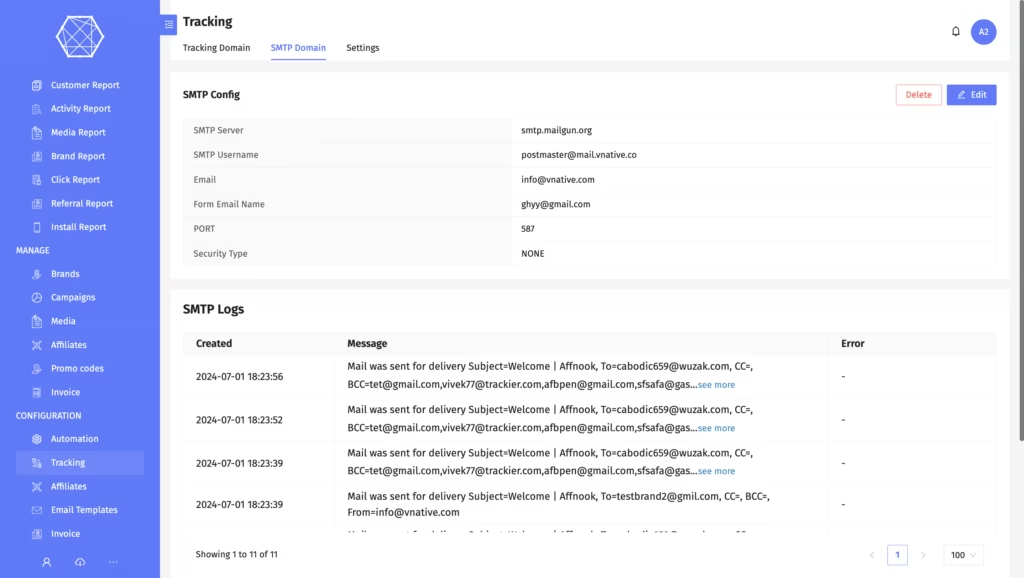
Reviewing SMTP logs regularly helps you confirm that automated emails are reaching your affiliates and catch any delivery problems before they affect your partner relationships.
Common SMTP Ports and When to Use Them
If you are unsure which port to select during setup, here is a quick reference:
- Port 25 is the original SMTP port and is still used for server-to-server email transfer. However, many providers block it for client use.
- Port 587 is the recommended port for sending email from a client application. It works with STARTTLS and is supported by most providers.
- Port 465 was originally assigned for SMTPS and is used for SSL/TLS connections. Some providers still require it.
When in doubt, check your SMTP provider’s documentation for the correct port and security combination.
Final Thoughts
A correctly configured SMTP domain is one of those foundational setup steps that quietly powers everything else in your affiliate program. Once it is in place, your automated emails go out reliably, your affiliates stay informed, and you have full visibility into delivery through the SMTP logs.