You’ve launched a campaign, the budget for it is set, the affiliates are also live, and then, within hours, the clicks come past the limit you had in mind. There wasn’t any pause, no warning, just traffic running unchecked.
For iGaming affiliate managers, uncontrolled click volume isn’t just a traffic problem, it’s a budget problem. Advertisers allocate specific budgets for campaigns. If clicks exceed what the budget can help with, you end up overexposing an offer, skewing your data, and putting your relationship with the brand at risk.
What Is a Campaign Click Cap?
A campaign click cap is a limit you set on the number of clicks a campaign can receive within a specific time period, which can be hourly or daily.
On reaching the defined limit, Affnook automatically takes action on the campaign, pausing it, suspending it, or leaving it unchanged, depending on what you have requested.
You can apply this campaign click cap:
- To each affiliate individually
- To a group of affiliates combined
- Based on who you want to include or exclude
You’ll get automated control over traffic volume without needing to monitor campaigns manually around the clock.
Why Does Campaign Click Cap Matter in iGaming Affiliate Marketing?
In iGaming campaigns, traffic management is a critical part of keeping your program profitable.
Here are the following reasons why a campaign click cap is essential:
Budget alignment – If an advertiser has committed to a fixed budget, uncapped clicks can exhaust that budget faster than expected, leading to disputes or loss of trust.
Traffic quality control – CAPs help you prioritise high-quality publishers and prevent a single affiliate from dominating your traffic mix.
Performance accuracy – Cleaner, controlled data is easier to optimize. When click volume is capped and attributed correctly, the reporting stays reliable.
Affiliate fairness – Distributing click limits fairly across affiliates ensures no single partner monopolises a campaign’s traffic allocation.
How to Set Up Campaign Click Cap in Affnook
Setting up a campaign click cap on Affnook takes just a few steps. The following are ways you can do the same –
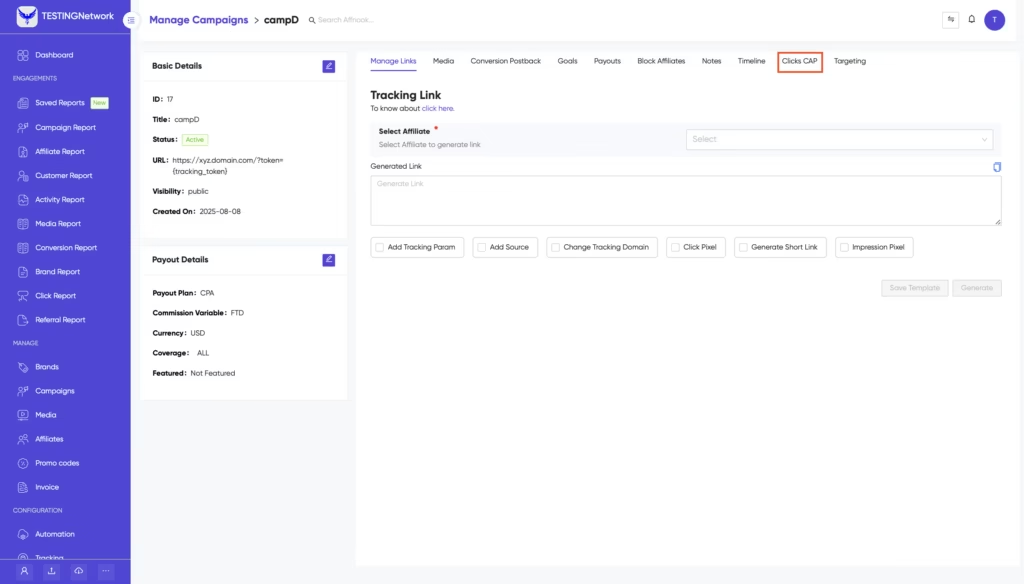
Step 1 – Open the Campaign
First navigate to the specific campaign for which you want to set the limit. Once inside the campaign, scroll to the Click CAP section.
Step 2 – Add a New Campaign Click Cap
Then, next, you are required to click on “Add click CAP”, so as to configure all the required settings for your CAP.
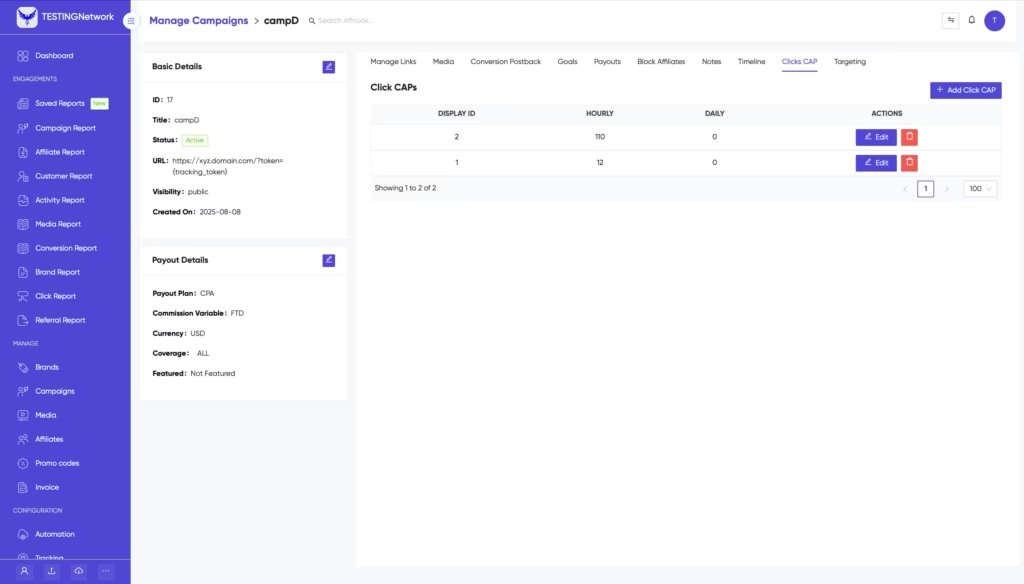
Step 3 – Fill in the CAP Details
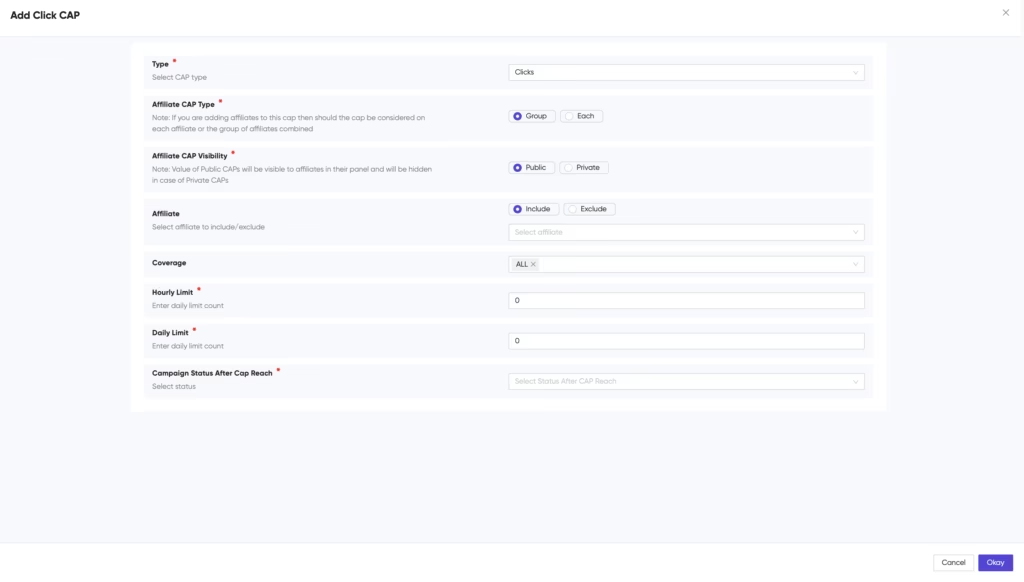
Here is a quick description of what each field means and how to use it:
1. Type – This helps define what metric the CAP is tracking.
2. Affiliate CAP Type – It helps determine whether the click limit applies to:
Each affiliate individually – every affiliate gets their own separate click limit
A group of affiliates combined – the CAP is shared across all selected affiliates as a pool
Choose based on how you want to distribute traffic across your affiliate base.
3. Affiliate CAP Visibility – This helps control who can see the CAP limit:
Public – affiliates can see the CAP that has been set for them
Private – the CAP is hidden from affiliates
If transparency with your partners is a priority, set the details to the public. If you wish to manage limits quietly, then there’s an option to keep it private.
4. Affiliate – This helps choose to include or exclude specific affiliates from the CAP. This is useful when you want to protect certain trusted partners from being subject to the limit, or when you want the CAP to apply only to a particular set of publishers.
5. Coverage – This helps set the geographic or segmented scope of the CAP, defining which portion of your campaign traffic the limit applies to.
6. Hourly limit – This helps define the maximum number of clicks allowed per hour. Once this threshold is hit, the configured action will be triggered.
7. Daily limit – This helps define the maximum number of clicks allowed per day. This resets every 24 hours and is useful for budget-aligned daily pacing.
8. Campaign status after CAP reach – This is the action taken finally, once the CAP is reached.
You have three options:
Pause – the campaign is temporarily halted until manually reactivated
Suspend – the campaign is put into a suspended state
No Change – the campaign continues running, but the CAP event is logged
Filling in all the required details, your campaign click cap will be active on the campaign.
How Campaign Click Cap Improves Affiliate Campaign ROI
More clicks don’t always mean better returns. Without a cap, budget drains fast, often on volume that was never part of the plan.
When limits are in place, spending stays predictable. Advertisers get what they signed up for, and there’s no awkward conversation about why the numbers ran over.
Campaign click cap also keeps traffic quality in check. Affiliates aren’t incentivised to push bulk, low-intent clicks just to hit volume. What comes through is more likely to actually convert.
And when the data isn’t bloated with unplanned traffic, reporting gets cleaner. You can spot what’s working, cut what isn’t, and go into the next campaign with something useful to act on.
How Campaign Click Cap Improves Reporting Accuracy
When click volume is left unchecked, the data that comes back is difficult to understand. A spike from one affiliate, an off-hour traffic surge, clicks that were never part of the plan, it all ends up in your reports and muddies the picture.
Capping keeps the numbers within a defined range. What you’re looking at in your dashboard actually reflects the campaign you intended to run, not a distorted version of it.
Attribution also gets cleaner. When each affiliate is working within a set limit, it’s easier to see who’s driving real results versus who’s just adding noise to the volume.
Over time, that accuracy compounds. Better data from one campaign feeds into smarter decisions for the next, tighter targeting, more realistic budgets, and benchmarks you can actually rely on.
Setting Campaign Click Cap Per Publisher vs. Per Group: Which Should You Choose?
This depends on how you’re managing your affiliate mix. If you’re running with a handful of well-established affiliates and want to ensure each stays within a designated boundary, go with individual CAPs. Each affiliate is allotted their own limit.
Running with a large group of smaller affiliates, and care more about overall campaign volume?
In this case, use group-level CAPs. The total is shared, and the campaign auto-pauses when the collective limit is hit.
Should Campaign Click Cap be set per Affiliate or per Campaign?
It comes down to who you’re working with. If you have a small group of established affiliates, individual caps make more sense, each partner gets their own limit, and you stay in full control of how traffic is distributed.
If you’re running with a larger pool of smaller publishers, a group campaign click cap is the cleaner option. The limit is shared, and the campaign pauses automatically once the total is hit.
When in doubt, use both a group cap to protect your budget and an individual campaign click cap for any high-volume affiliates who could burn through it alone.
Your Next Move in Affiliate Marketing
Click volume without control is a liability in iGaming affiliate marketing. Campaign click cap in Affnook gives you the infrastructure to run campaigns within defined, predictable boundaries, automatically, without manual intervention.
Capping hourly to protect time-sensitive offers or setting daily limits to stay within an advertiser’s allocated budget, the tool keeps your campaigns clean, your data accurate, and your brand relationships intact.