Picture this. An affiliate shares your tracking link with their audience. The player hovers over it and spots a random third-party domain they have never seen. In iGaming, where trust decides whether someone clicks or closes the tab, that one unfamiliar URL can kill your conversion before the landing page even loads.
That is the exact problem a white label tracking domain solves. Affnook gives you a default tracking domain out of the box, but you can replace it with a white label tracking domain that carries your own brand. Your links look like yours, your affiliates share URLs that players actually trust, and your traffic stays clean.
This guide covers why a white label tracking domain matters for your affiliate program and walks you through the full setup, from buying a domain to making it live on your Affnook panel.
Why White Label Your Tracking Domain?
A custom tracking domain is not just a cosmetic upgrade. Here is what it actually does for your program.
- Brand consistency and trust. Every link your affiliates share becomes an extension of your brand. Players are far more likely to click trk.yourbrand.com than an anonymous tracking URL. For iGaming operators, where regulation and player skepticism run high, branded links deliver a consistent user experience across every touchpoint.
- Traffic segmentation. You can run separate domains for specific campaigns or traffic sources. Want to distinguish your casino traffic from your sportsbook traffic at the domain level? Set up a dedicated white label domain for each, and your reporting instantly gets cleaner.
- Domain spam protection. Shared default domains carry shared reputations. If you white label, your links stand on your own domain reputation, which reduces the risk of your links getting flagged or blocked by email providers and ad platforms.
- Affiliate exclusivity. Affnook lets you whitelist a tracking domain for specific affiliates only. That means you can hand premium partners their own branded domain while the rest of your network runs on the default. It is a small gesture that goes a long way in affiliate relationships.
How to Set Up a Custom Tracking Domain in Affnook
The full setup takes four steps. None of them require a developer, though you will need access to your domain provider account.
1. Purchase a Domain
Start by buying a domain from any provider you prefer, such as GoDaddy, Namecheap, or Cloudflare. Pick something short and clearly connected to your brand. If your brand is Adzilla, domains like adzillatrack.com, adztrack.co, or adzilla.io all work well for tracking.
2. Add a CNAME Record
Next, you need to point a subdomain of your new domain to Affnook. Log in to your domain provider and open the DNS settings. One thing to double check here: update the DNS wherever your nameservers are actually pointed, not just where you bought the domain.
Now grab the CNAME value from your Affnook panel by navigating to Tracking, then Tracking Domain. Back in your DNS settings, create a new record with these details:
- Type: CNAME
- Host: Any subdomain you want, like trk or go. This sits in front of your main domain, so trk on mydomain.com gives you trk.mydomain.com
- Points to: The CNAME value you copied from your Affnook panel
- TTL: 1 hour works fine
Once saved, run your domain through a DNS record checker. If the record shows as propagated across all regions, you are ready for the next step.
3. Generate SSL
With the CNAME in place, your domain needs an SSL certificate so your tracking links run on HTTPS. If you bought your domain through Cloudflare, SSL gets generated automatically. If you are an enterprise client and need SSL generated for your custom domain, just reach out to the Affnook support team, and they will handle it.
4. Add the Domain to Your Affnook Panel
The final step happens inside your panel.
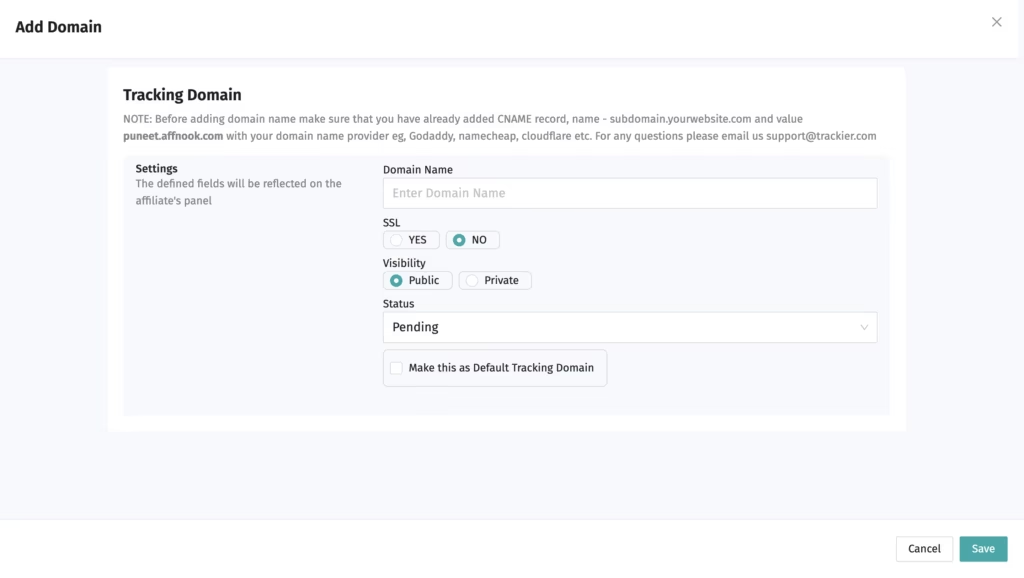
- Click +Add Tracking Domain and enter your new custom domain
- Once SSL is complete, switch the SSL option from No to Yes
- Optionally, whitelist the domain for specific affiliates. Only whitelisted affiliates will see this domain and get tracking links generated on it
- Check the Default Tracking Domain box if you want this domain to become the default for your program
One important note on that last setting. Making a new domain the default only affects upcoming campaigns. All your currently running campaigns keep functioning on the previous default domain, so nothing breaks mid flight.
That is it. Your white label tracking links now carry your brand everywhere; your affiliates take them.
Best Practices to Get the Most Out of Your White Label Tracking Domain
Setting up the domain is step one. Keeping it healthy is what protects your clicks long term. A few habits worth building:
- Keep your SSL current. An expired certificate turns your white label tracking links into browser warnings overnight. If you manage SSL yourself, set a renewal reminder well before the expiry date.
- Monitor your domain reputation. The whole point of a white label domain is owning your reputation, so check it periodically with tools like Google Postmaster or MXToolbox. If a rogue affiliate sends spammy traffic through your links, you want to catch it before email providers do.
- Use separate domains for separate risk levels. If you work with affiliates running aggressive traffic sources, consider giving them a dedicated white label tracking domain. That way, any reputation damage stays contained and never touches the domain your premium partners use.
- Review your whitelisting quarterly. Affiliate rosters change. Make sure domain access still matches your current partner tiers.
Wrapping Up
A white-labeled tracking domain is one of those setups that takes thirty minutes once and pays off on every single click after. Your affiliates share links that look trustworthy, your campaigns get cleaner segmentation, and your brand shows up consistently across your entire affiliate marketing program.
If you want help setting up your custom domain or want to see how Affnook handles white label tracking end to end, book a free demo and our team will walk you through it.