Imagine you launch an affiliate campaign and everything looks good, Clicks are coming, the conversion rate is high, and revenue projections are on track.
And suddenly, you realize that half of the traffic was fake.
Bots, proxies, and suspicious IPs are quietly draining your ad budget and putting your brand relationship at high risk.
For affiliate managers, this is one of the biggest hidden threats.
This is where the Anti-Fraud Tool in Affnook steps in.
Let’s break down how it works and how you can use it to keep your campaigns clean, compliant, and profitable.
What is the Anti-Fraud Tool in Affnook?
The Anti-Fraud Tool is Affnook’s built-in protection system, which is designed to help you detect, filter, and block fraudulent traffic before it harms your business.
Instead of manually guessing which clicks are real and which are not, the tool gives you:
- Smart fraud detection capabilities
- Automated traffic filtering
- Detailed fraud analytics
- Custom rule creation
- Action-based controls to mark or block suspicious activity
All of this helps you maintain strong relationships with iGaming brands and protect your hard-earned revenue from fake traffic.
Where to Find the Anti-Fraud Tool in Affnook
Accessing the tool is simple.
- Go to Automation in your Affnook dashboard
- Click on the Anti-Fraud option
From here, you can view existing rules or create new ones based on your campaign needs.
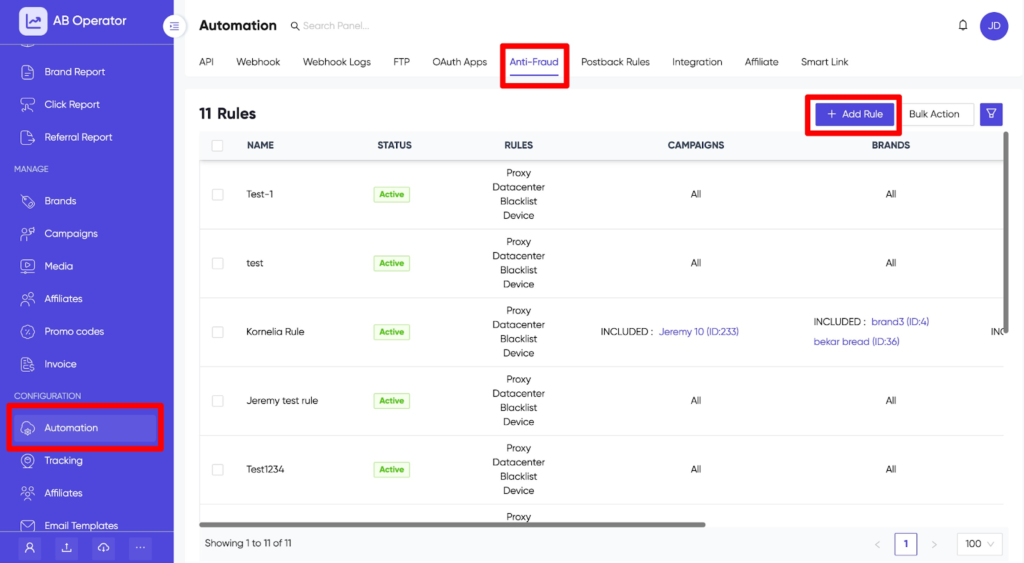
Once you click on Add Rule, you will be redirected to a page where you can define conditions, set multiple rules, and choose actions to handle suspicious traffic.
How to Add an Anti-Fraud Rule
Accessing the tool is simple.
- Go to Automation in your Affnook dashboard
Click on the Anti-Fraud option
From here, you can view existing rules or create new ones based on your campaign needs.
Once you click on Add Rule, you will be redirected to a page where you can define conditions, set multiple rules, and choose actions to handle suspicious traffic.
How to Add an Anti-Fraud Rule
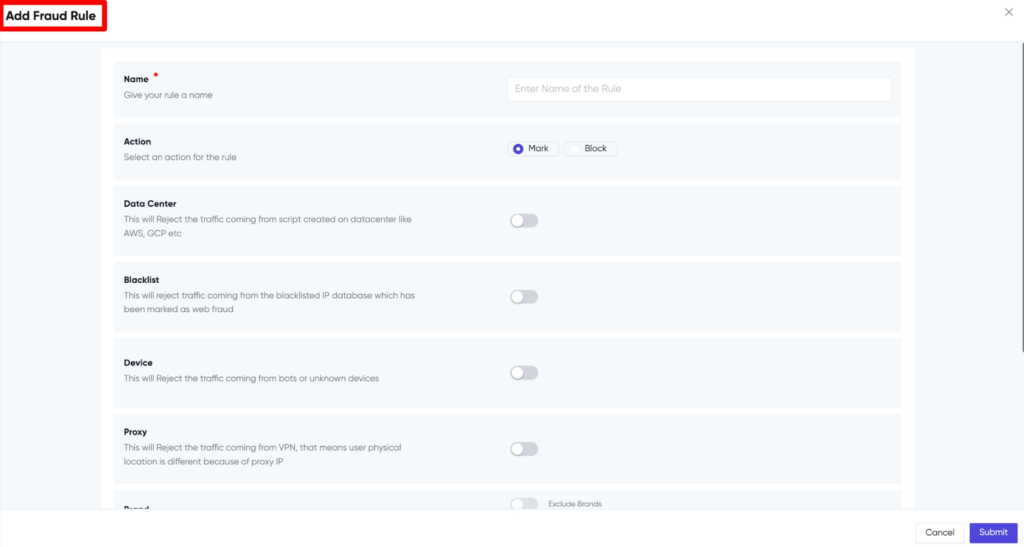
Setting up a fraud prevention rule in Affnook is straightforward. Here is how each setting works:
1. Name Your Rule
The first step is to give your rule a clear name.
This name will appear on the Manage Fraud Rules page, so make sure it is descriptive enough for easy identification later.
2. Choose the Action: Mark or Block
This is where you decide what happens when traffic matches your fraud conditions.
You get two options:
Mark
- The traffic is allowed to pass through
- The click will still be recorded
- But it will be flagged as “Fraud Click” in the system
This option is useful when you want to monitor suspicious activity without immediately rejecting it.
Block
- The traffic is completely rejected
- The click will not be counted
- It will be labeled as fraud and prevented from affecting your campaign
Use this when you are confident the traffic source is harmful.
Apply Fraud Rules Exactly Where You Need Them
One of the biggest advantages of the Anti-Fraud Tool is the level of control it gives you. You are not forced to apply rules across your entire account. Instead, you can apply them only where necessary.
This means you can target risky areas without disrupting your legitimate traffic.
Here is how you can apply rules selectively:
- Brand level: You can choose specific brands where the rule should apply. This is useful if a particular brand is experiencing suspicious traffic, while others are performing normally.
- Affiliate level: If you notice unusual activity from certain affiliates, you can apply fraud rules specifically to them. This allows you to monitor, mark, or block suspicious traffic without affecting trusted partners.
- Campaign level: You can also apply rules to individual campaigns. This is helpful when testing new traffic sources or protecting high-value campaigns that require stricter monitoring.
This targeted approach ensures you stop fraudulent activity at the source while keeping genuine traffic flowing smoothly.
Smart Filters That Help You Detect and Block Fraudulent Traffic
Affnook’s Anti-Fraud Tool comes with multiple built-in detection layers. Let’s look at them one by one.
Data Center Detection
Many fraudulent clicks originate from data centers rather than real user devices.
Affnook maintains a database of IP ranges from major providers like:
- AWS
- Google Cloud (GCP)
- Other known hosting networks
If a session is coming from a data center IP, there is a high chance it is not a genuine user.
This filter helps you easily identify and block such traffic.
Blacklist Protection
Affnook also maintains a list of IP addresses that are already known for fraudulent activity.
With this option, you can automatically block:
- Blacklisted IPs
- Anonymous IP addresses
- Known fraud sources
This ensures repeat offenders never reach your campaigns.
Device Block
Fraud is not just about IP addresses. Many fake clicks come from:
- Crawlers
- Emulators
- Automated scripts
Affnook tracks device behavior patterns and blocks traffic from such suspicious sources in real time.
Proxy Detection
A large portion of fake traffic hides behind proxy networks.
The Proxy filter detects and blocks:
- Public web proxies
- VPN-based traffic
- Other masked IP sources
Affnook maintains a constantly updated database to ensure no proxy traffic slips through unnoticed.
Why the Anti-Fraud Tool Matters
Fraudulent traffic does more than just waste money.
It can:
- Damage your campaign performance
- Hurt trust with advertisers
- Distort analytics
- Reduce overall ROI
With Affnook’s Anti-Fraud Tool, you get proactive protection instead of reactive damage control.
You can automate fraud prevention, monitor risks in real time, and ensure only high-quality traffic reaches your brands.
Final Thoughts
Fraud is becoming smarter every day. Your protection should be smarter, too.
Affnook’s Anti-Fraud Tool gives you everything you need to:
- Detect suspicious traffic
- Block fake clicks
- Protect campaign budgets
- Maintain clean performance data
All without manual effort.
If you are serious about running profitable and trustworthy affiliate campaigns, setting up strict anti-fraud rules is not optional anymore. It is essential.
Start using the Anti-Fraud Tool today and keep your campaigns safe from the inside out.