You launch a campaign, and suddenly your dashboard starts growing.
Traffic flows in.
Clicks appear from multiple iGaming affiliates, across different sources, devices, and locations.
On the surface level, everything looks good.
But wait for a second and ask yourself this:
Do you actually know what’s happening behind those clicks?
Which ones are real?
Which ones are repeat visits?
Which affiliate or source is truly adding value, and which one is just inflating numbers?
This is exactly where the click report in Affnook becomes your single source of truth.
In this article, you will learn what a click report is and how to read them easily in Affnook for better campaign decision-making without any confusion.
What is a Click Report in Affnook?
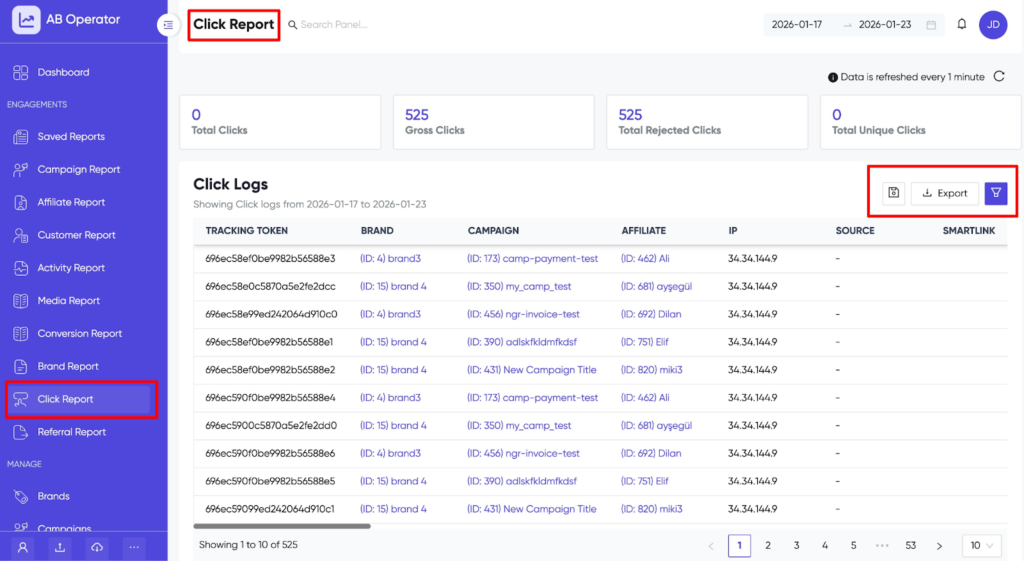
A click report gives you a clear view of every click that is tracked on the platform.
Once a user clicks on a tracking link, the system captures that interaction and stores multiple attributes related to it. These attributes describe the click from different angles, such as the iGaming affiliate who sent it, the campaign it belongs to, the user’s location, device, and whether the click was accepted or rejected.
In simple terms, a click report answers three key questions:
- Where did the click come from?
- How did the click happen?
- Can the click be trusted?
In Affnook, click reports act as the foundation for traffic analysis. Every conversion, payout, or performance review starts with understanding click-level data.
Why Click Reports Matter in Campaign Tracking
Clicks are often the first measurable action in a campaign. Before a registration, deposit, or conversion happens, a click must occur.
If click data is unclear or misleading, everything built on top of it becomes unreliable.
Click reports help in several practical ways:
- Identifying which affiliates are sending genuine traffic
- Understanding which sources and regions perform best
- Detecting duplicate or suspicious clicks early
- Comparing campaign performance accurately
- Improving optimization decisions with real data
Without a clear click report, it becomes difficult to separate quality traffic from inflated numbers.
Let’s Understand Click Report Attributes
Each row in a click report represents a single click. Each column adds context to that click. Understanding these attributes helps refine raw data into insights.
Here are some simple explanations of each reporting attribute.
1. Tracking Token
A tracking token is a dynamic value passed by a traffic source, most commonly from paid advertising platforms.
It helps identify specific ads, keywords, or placements within a campaign. When multiple ads run under the same campaign, tracking tokens make it possible to see exactly which ad or variation generated the click.
This level of detail is especially useful for granular performance analysis and campaign optimization.
2. Brand
The brand column shows which brand the click belongs to.
For accounts managing multiple iGaming brands, this attribute helps keep traffic and performance data clearly separated. It ensures clicks are always attributed to the correct brand without confusion.
3. Campaign
This column displays the campaign name along with its unique campaign ID.
Campaign-level tracking makes it easier to compare performance across campaigns, identify trends over time, and understand which campaigns consistently attract traffic.
4. Affiliate
The affiliate column shows the affiliate name along with their unique affiliate ID.
This data helps evaluate affiliate performance, identify traffic patterns, and resolve attribution or payout-related questions with clarity.
5. IP Address
The IP address identifies the network from which the click originated.
IP data plays an important role in detecting unusual activity, repeated clicks from the same source, or traffic coming from restricted or unexpected locations.
6. Source
Source indicates where the traffic originated.
This could represent a specific affiliate channel, a paid advertising campaign, or another marketing source. Source-level visibility helps understand which channels are contributing meaningful engagement versus low-quality traffic.
7. Country, Region, and City
These three attributes provide geographical context for each click.
- Country shows the user’s country
- Region shows the state or province
- City shows the local area
Geographical data is critical for compliance checks, geo-targeted campaigns, and understanding regional performance trends.
8. Operating System (OS)
This attribute shows the operating system used by the visitor, such as Android, iOS, Windows, or Linux.
OS data is useful when analyzing app traffic, identifying compatibility issues, or understanding platform-specific behavior.
9. Media Name
The media name reflects where the traffic placement occurred.
It adds another layer of clarity when multiple placements or media channels are running under the same campaign.
10. Fraud Category
When a click is rejected due to anti-fraud rules, this column explains the reason.
Instead of guessing why a click was excluded, the fraud category provides transparency and clarity.
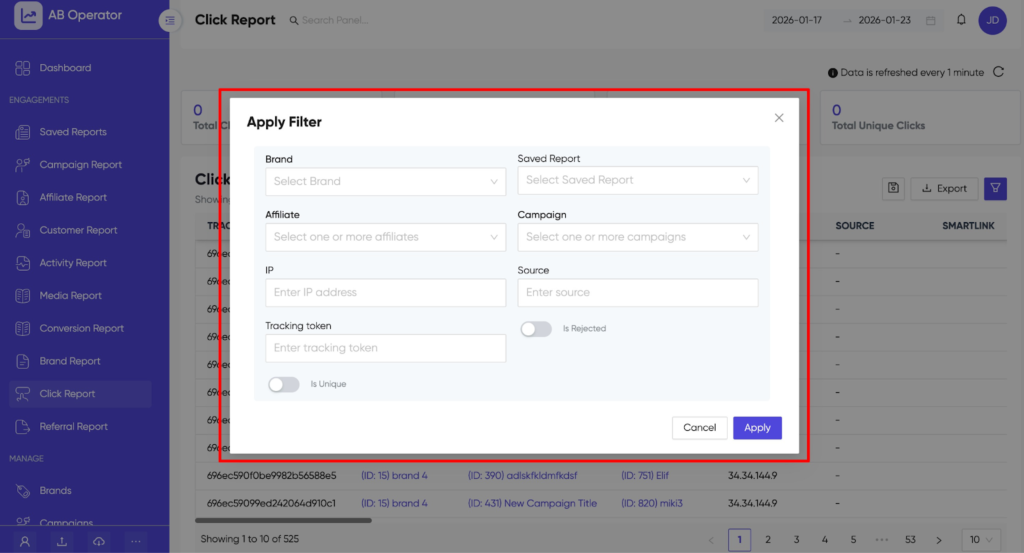
11. Date Range Selection
A date range selector is available at the top of the report.
It allows filtering data by specific time periods, making it easier to analyze trends, spikes, or drops in click activity.
How to Export Click Reports
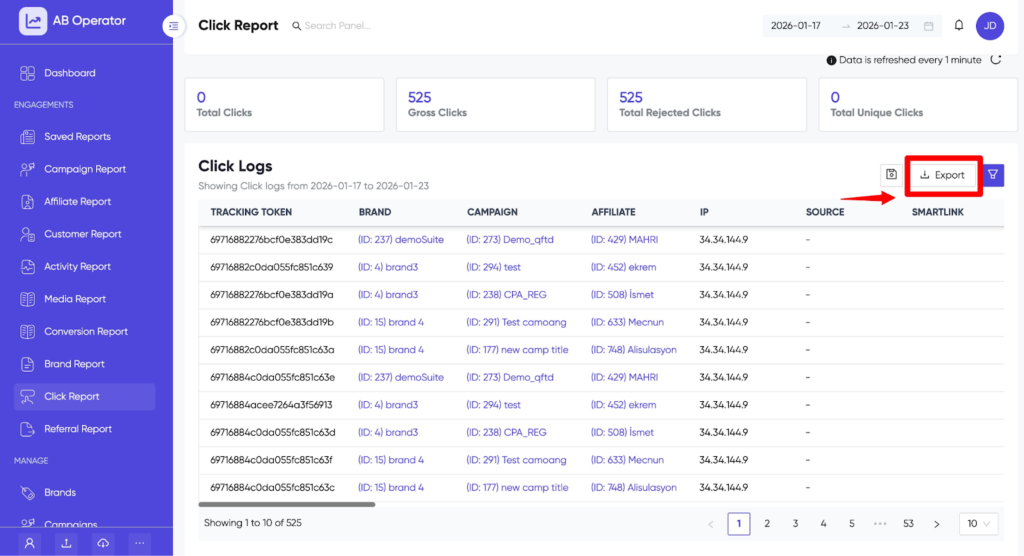
Exporting the click report is followed by a simple step.
First, you have to click on the export icon in the top corner, then your report starts downloading to your system. After that, you can rename your file according to your needs. Mainly, exported click reports are mostly used for audits, internal performance reviews, or sharing data with partners.
In this exported file, all the selected filters and data ranges remain applied, ensuring the data matches exactly what is shown on the dashboard.
How Click Reports Help Improve Campaign Decisions
Click reports are not just about tracking activity. They are about understanding user behavior.
By reviewing click data regularly, it becomes easier to:
- Identify high-performing affiliates
- Spot low-quality or suspicious traffic early
- Optimize campaigns based on real engagement
- Improve attribution accuracy
- Build stronger trust with partners
When click data is clear, campaign decisions become confident rather than reactive.
Summing Up
Every campaign journey starts with the clicks. Understanding where they come from, how they behave, and whether they are valid or not makes a significant difference in performance tracking. A well-maintained click report helps to remove guesswork and provide clarity on data.
When you use this report correctly, your raw data turns into actionable insight, and you can also scale your campaigns with confidence and control.